Pages

Subscribe:
Showing posts with label Ben Schersten. Show all posts

Thursday, 9 April 2015

Day 131 - A Better Way to Cite Images - Ben Schersten - Francis Wyman IT Specialist

As my students know, I’m big on permissions. If my students want to use an image in a project, they need to pay attention to Creative Commons licensing. Finding an image that is okay to use isn’t hard (you can search through Creative Commons or change the search tools in Google), but citing it properly is a hassle – especially for my younger elementary students.
Enter Photos For Class (www.photosforclass.com)
Photos For Class searches Flickr and does three great things:
  • Keeps the images G-rated using Flicker’s and their filters
  • Only grabs images licensed for school use under Creative Commons
    and, this is the best part
  • The citation is automatically added to the image
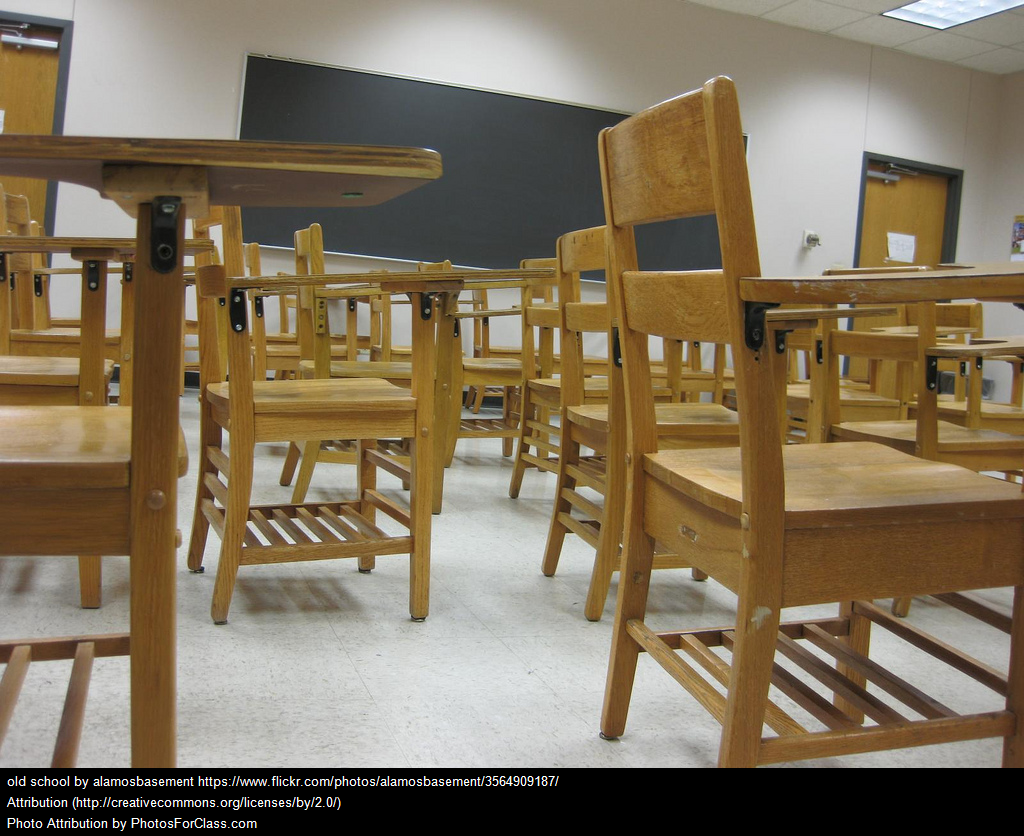
Also, it’s super easy! Enter your search term, find the image you want, click download, and you get an image with an embedded citation – like these:
4743036023
137546658
3564909187
And since the citation is part of the image, no matter where students move the image the citation goes with it. Using properly licensed photos is important, but keeping track of citations can be a headache. Photos For Class is a great solution.

Monday, 2 March 2015

Day 104 - Google and Schools - Ben Schersten - Francis Wyman IT Specialist


Yesterday I had the opportunity do attend a teacher PD day at the Google offices in Cambridge, MA. At the end of the day there was a panel of Googlers and one of the questions was, “what do you like best about working for Google?”
The answers were much what you would expect from a company that is often rated as one of the best places to work. Things like:
  • Great people
  • Being connected to current events
  • A culture of collaboration
  • A job where you get to use your brain every
  • A place where nobody ever says, “I can’t help you, that’s not my job.”
This poses the most obvious question: isn’t this what schools are supposed to be like? 


Seriously, if someone asks your teachers why they like their job shouldn’t this be part of their answer too? And if it’s not, why? And how do you start changing that?

Tuesday, 10 February 2015

Day 95 - Looking for 1:1 Success? You Need Ubiquity! - Ben Schersten - Francis Wyman IT Specialist


ipad_paperThere are lots of things that will make a 1:1 environment (iPads, Chromebooks, laptops, BYOD, etc.) successful, but without ubiquity you won’t find success. If you’re going to go 1:1 technology can’t be an extra thing, it has to permeate everything.
Think about it like this, the iPad is an educational tool. You wouldn’t hide your constructions paper or scissors or makers away and only get them out for special projects (I hope). If you do, that Social Studies project starts to become a construction paper and scissors project; the project becomes about the tool not the content.
The same is true for technology. If you keep it away and only get it out for a limited number of specific activities, that Science project starts to become a technology project.
If you want students to use technology effectively they need lots of practice. If they’re working in a content area you want them focusing their energy on the content, not how to use the tool (technology).
Sure, there are times when you want to unplug. I’m not suggesting that we go all-technology all-the-time, but if you want success the tool needs to be available as much as possible – like all their other school supplies/tools (construction paper, scissors, markers).

Friday, 9 January 2015

Day 79 - Creating a Google Custom Search Engine - Ben Schersten - Francis Wyman IT Specialist

Teaching students how to search effectively is essential. But letting an elementary student loose on Google makes a lot of people nervous (which is okay). School filters are good, but they aren’t perfect (which is also okay, but that’s another post altogether). A GoogleCustom Search Engine is a great compromise. It allows students to use the Google search engine, but it also allows you to limit the webpages and websites that are used for the results. And best of all, creating a Custom Search Engine is easy.
First, head over to www.google.com/cse.
Look for the blue bottom that says, “Create custom search engine.”
Screenshot 2015-01-08 at 10.39.58 AM
If you’re not logged into a Google account, the blue button will ask you to sign in first.
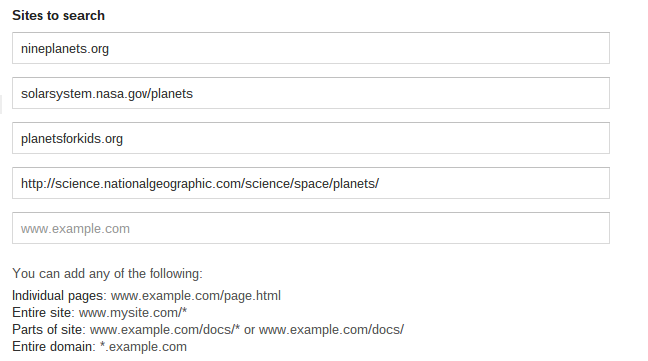
Second, you need to add the websites you want your Custom Search Engine to use. Every time you add a new site, an additional box will appear for you to add another. In my example I’ve added some sites with good information on planets.
Screenshot 2015-01-08 at 10.43.24 AM
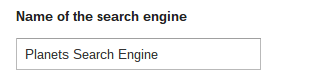
Next, you name the search engine.
Screenshot 2015-01-08 at 10.43.40 AM
Finally, find the blue “Create” button.
That’s it! It’s ready to go. You just need to get your students to the search page.

Friday, 19 December 2014

Day 72 - Making Book Trailers Better: Legacy - Ben Schersten - Francis Wyman IT Specialist

This post originally appeared on Ben's Blog

iMovie-2.0-for-iOS-app-icon-smallMany teachers have used the iMovie Trailer function to make book trailers. But what do we do with them? How do we make sure those trailers last? How do we make sure students, lots of students, see those trailers? How do we make sure students use those trailers to help them choose books they’ll like (because that’s really the point of a trailer)?
QR Codes!
Okay, first, I don’t love QR codes; I know some teachers adore them. I think they have limited use, but this is definitely one of them.
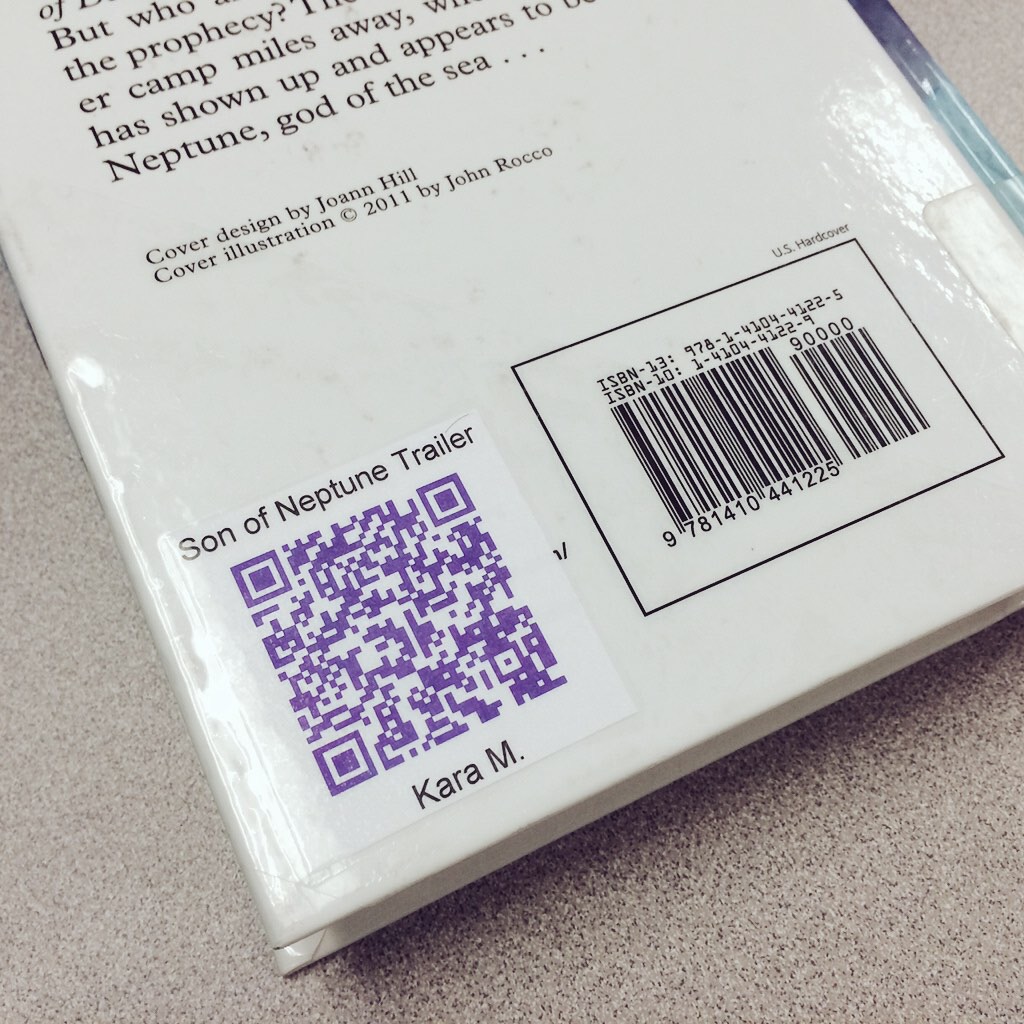
Book QR Code
Our first trailer. The student chose the color.
Once you make your trailer, put it in a public place on the web. We’re a Google Apps for Education (GAFE) district, so we put them in drive and then made them public to anyone with the link. Then create a QR code for the movie (we used theQRafter app and the QRStuff site). Then head to library and put that QR code on every copy of the book. Now, when students go to the library (we’re a 1:1 iPad district) they can scan the QR code and see a visual trailer for the book created by a student (in addition to the blurb on the back). If books are going to be displayed cover-out, put a copy of the QR code on the front too.
And (this is the best part), the movie file is stored in a stable place in the cloud. So as my elementary school students who created the trailers move through middle and high school the trailer will still be sitting in their Google Drive available for younger students to see it. Five or more years from now, students will be watching the trailers we created this year!
Our students do great work; make sure it isn’t lost when summer arrives. Help them create a legacy.
Note: I’ve written about iMovie trailers before. Here is a post with single-page, printable storyboards for all the trailer themes. Here is a post about using trailers as a way for students to introduce themselves to next year’s teacher. And here is a post about moving beyond trailers and getting into iMovie projects.

Monday, 22 September 2014

Day 15 - #Chromebook Keyboard Shortcuts - Ben Schersten, Francis Wyman IT Specialist

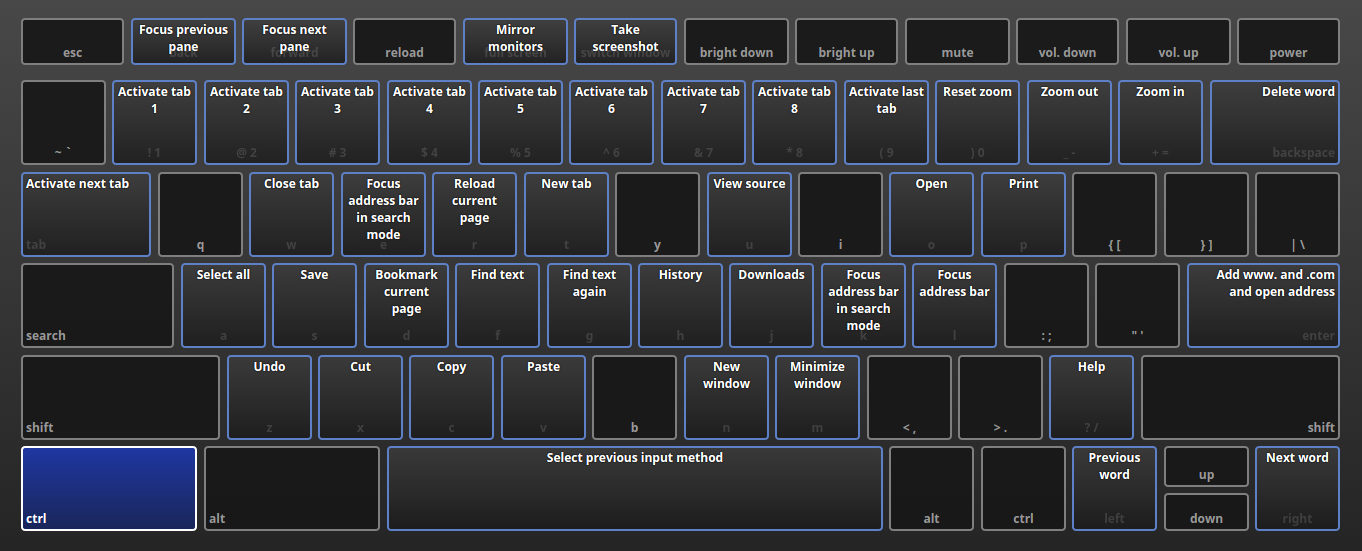
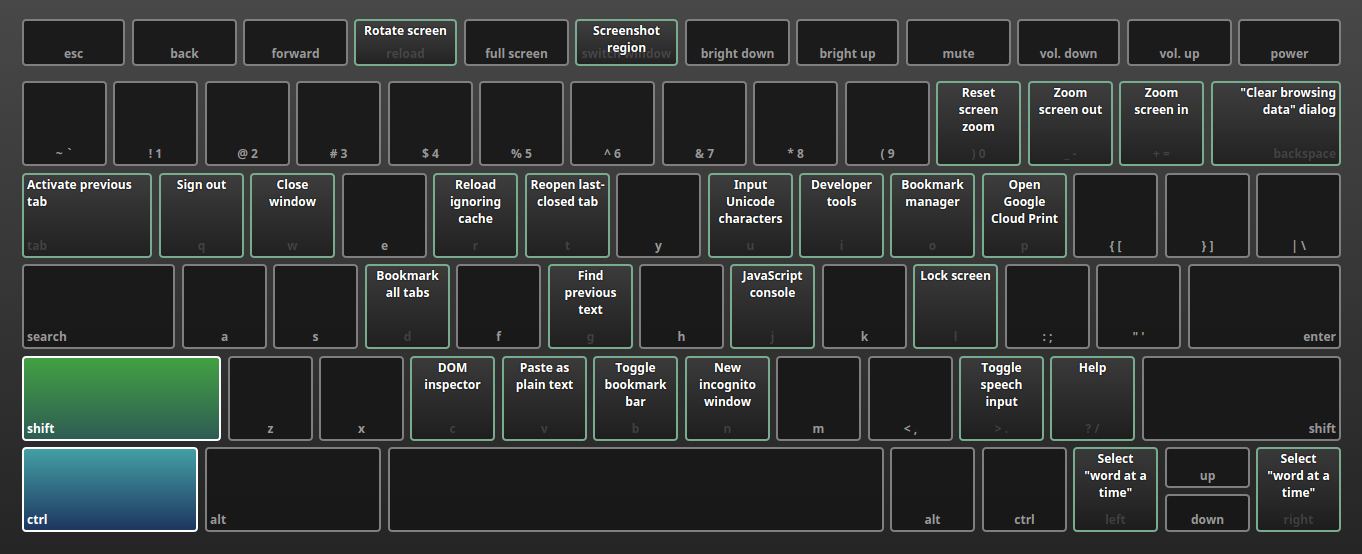
I’m a big fan of keyboard shortcuts (the alt-tab was a game-changer for me), so when I stumbled across this in my Chromebook’s settings, my mouth dropped. It’s beautiful interactive visual of how the keyboard functionality changes with the shortcut keys.
If you hold down the Control (ctrl) key, these are the shortcuts (click to enlarge):
Screenshot 2014-09-19 at 10.54.56 AM
If you hold down the Control (ctrl) and the Shift key, these are the shortcuts (click to enlarge):
Screenshot 2014-09-19 at 10.55.36 AM
There’s an awful lot you can quickly access.
On a Chromebook, use the URL chrome://keyboardoverlay/ to access this.

Tuesday, 3 June 2014

Day 166 - Is Your School Year Winding Down or Winding Up? - Ben Schersten, Francis Wyman IT Specialist


As we head into the final weeks of the school year things start to wind down. Projects are due, and new ones don’t start. We start doing those end-of-year assessments that take us away from our daily and weekly routines. Homework tapers off. We all look forward to the relaxation and routine changes that come with summer vacation. But is this wind down as relaxing for the students as it is for the teachers?
I’ve written before about how students secretly hate vacations, and this certainly applies to summer vacation. For some students, summer is a time of travel and seeing family. For others it mean uncertainty and all-day day care. We all have students who crave the safety and routine that schools provide.
Keep an extra eye on those kids as the year winds down. Those kids look forward to the routine of the Monday morning fluency test in math, the Wednesday reading journal, or the Friday afternoon spelling quiz. Changing your routines may wind those kids up more than anything else. So even if deep down you know your grades are done and that that last week of spelling won’t actually count, consider giving it anyway. That continued routine is exactly what some of your students want (need) in those final weeks. (And you don’t have to tell your students that quiz won’t actually make it into the gradebook.)
photo credit: Ben McLeod via photopin cc

Thursday, 22 May 2014

Day 159 - One Space or Two? - Ben Schersten, Francis Wyman IT Specialist

In high school, when I learned to type, I was told that a period (or any punctuation) at the end of a sentenceMUST be followed by exactly two spaces. Ten years later when I was writing curriculum units for publication I was told that a period (or any punctuation) at the end of a sentenceMUST be followed by exactly one space. What happened?

The Abreviated Story:

First there were books…

Variable space typing has been part of printing for, well, basically forever. This meant that not all letters were the same width. A lower-case i didn’t take up as much space as a lower-case m, and making spaces of different sizes was easy. And at the end of a sentence a slightly longer space (though not as big as two spaces) was generally used.

Then came the typewriter…

origin_12149305295When most of us learned to type (or when our teachers learned to type) we learned on typewriters. Typerwriters are great, but they have an important limitation: every character has exactly the same width.Sentences look like this.  The i and the m were the same width. To add some extra clarity to the end of sentence, an extra space was added; so we all used two spaces.

Then came computers…

Then with affordable computers, the average person at home had access to variable space typing, letters and spaces of different widths; the computer took care of this automatically. Since then, the push for two spaces has been less common; many have gone back to one space. What do the style guides say now?
  • US Government Printing Office: One space between sentences.
  • Oxford Style Manual: One space between sentences.
  • Chicago Manual of Style: One space between sentences.
  • Modern Language Association (MLA): One space between sentences.
  • American Psychological Association (APA): Two spaces between sentences, for draft manuscripts. One space between sentences for published or final versions.
  • Style Manual for Political Science: One space between sentences.
  • Associated Press Stylebook: One space between sentences.

Oh, and now the Internet…

If you’re writing something that will end up on a webpage (like this blog post), it doesn’t matter what you do. HTML is programmed to ignore multiple spaces. No matter how many you put; one, two, three, four; it will be rendered as only one. Sorry. (That means in the “typewriter” text above I had to dig into the code to get the HTML to create a second space.)

What should we teach our students?

One space.


If you’re interested in longer versions of the history of sentence spacing you can find themhere and here. For more specifics on what the style guides say about sentence spacing, that’s here.

Thursday, 8 May 2014

Day 149 - Coding Club A Huge Success - Ben Schersten, Francis Wyman IT Specialist


For the past five Mondays, Mr. Musselman and Mr. Schersten have been holding an after-school coding club for 3rd, 4th, and 5th graders. The students used Hopscotch, a free, introductory coding app using visual programming “blocks” to instruct the behavior of objects on screen.
Students worked their way through a series of challenges presented by Mr. Musselman and Mr. Schersten that progressively built their understanding of how programming works. Along the way they grappled with common problems programmers face when building animations, games, and technological tools. Many students were surprised at the amount of math being used in the coding, but quickly gained valuable understanding of mathematical concepts in graphing, angles, geometry, and rates of change.
photo 4 (3)By week five students with almost no programming experience had designed some amazing work. Students initially challenged with simply sketching their name on screen were able to design programs modeled after some of their favorite apps! Follow the links below to see some of their fantastic programs. To get the ultimate experience, visit these links with a tablet that has the Hopscotch app installed. Viewing these links without the app will cause some of the programs to not work properly and limit their interactivity.
It was great to see all that the students accomplished.

Wednesday, 2 April 2014

Day 130 - Are You Just a Teacher or a Just Teacher? - Ben Schersten, Francis Wyman IT Specialist

Last week I read a blog post by Deborah Mills-Scofield on Switch & Shift called Are You Just a Leader or a Just Leader? Like many of the business leadership blog posts out there, it applies to teaching too. In fact, after reading it, I went back and reread it replacing “leader” with “teacher,” and “people” and “customer” with students. This left me with a great blog post, about management teaching.
Here’s some of the post, through an educator lens:
Being a leader teacher requires taking the right road, not the easy road. Treating ourpeople students fairly requires judgment, subjectivity, and clear communication of expectations and goals on an ongoing basis since the world around us changes all the time. When we treat our people students equally but not fairly, we tell people our students it’s ok to underperform and under contribute undermining the morale of our dedicated and passionate people students and are then surprised when we get mediocre output and outcomes.
What if we modify the culture to recognize people students fairly, based on their work, effort, passion, and results – as individuals and teams? We will be surprised to see the positive difference it will make.
I versus You
…I often ask my corporate educator colleagues if focusing on ‘I’, on themselves, has really gotten them the career satisfaction they sought. As leaders teachers, we need to help our people students focus on the “You” – the customer student, the recipient of our services and products and you the employee. If we honestly ask ourselves who matters more, ‘I’, ourselves or ‘You’ our customers and people students, what is our answer?
A true leader teacher is a servant who leads. So, is the business education about our needs or the needs of ‘others’? Are we really focused on delighting our customersstudents (to quote my friend Steve Denning), which means we will delight our peoplestudents because they are working on meaningful, purposeful solutions to real needs (outcomes) that result revenues and profit (outputs) in learning that can be reinvested in the delighting our customers applied to their lives? Or, are we doing this for the next perk, the accolades from our peers, the prestige from our position? I’m not suggesting total altruism (though that’s not a bad idea!), but I am suggesting we ponder why we’re leading teaching and whom we’re leading teaching – is it about ‘I’ or about ‘You’? Can we really lead teach if it’s about us? Would we want to be led taught by someone who was all about himself? Does our leadership teaching truly reflect our why and who? If someone asked one of our people students who mattered to us, ‘I’ or ‘You’, what would they answer?
As we approach the middle of 2013 spring, ask yourself two questions: do you treatpeople students equally or fairly (or both) and does your leadership teaching, hence your classroom culture, value ‘You’ over ‘I’?
So, are you a just a teacher or a just teacher?
photo credit: InsideMyShell via photopin cc

Monday, 17 March 2014

Day 118 - iMovie Trailers and Coloring Books - Ben Schersten, Francis Wyman IT Specialist

This post originally appeared on Ben's Blog
iMovie-2.0-for-iOS-app-icon-smalliMovie on the iPad is pretty awesome. And the Trailer function is a great starting point (you can find my iMovieTrailer storyboards here). But remember, it’s just that – it’s just a starting point. Most of the teachers I know who have used it for a student project come away from the experience saying, “that was great, but now that I get it I wish it could do more.” Fortunately, you can.
photo (2)
You see, the Trailer function is a lot like a coloring book; all you can do is color in the lines. Sure, you can assign a project to your students using the Trailers and they’ll all come out different, but they’ll also all kind of be the same. It’s like a coloring book: each kid can use different colors, but they all kind of end up with the same picture.
So use the Trailers, and then grow out of them. Start using the Movie function. Start drawing with a blank piece of paper. There’s so much more you can do.
And here’s a generic iMovie Movie storyboard. I think it’s a good idea to have students do some planning before they get a camera in their hands.
Enhanced by Zemanta

Friday, 7 March 2014

Day 112 - Why I Always Follow [my students] Back - Ben Schersten, Francis Wyman IT Specialist

Image representing Twitter as depicted in Crun...
Image via CrunchBase
This post originally appeared on Ben's Blog 

The first time it happened it was kind of alarming. I had been using my Twitter account to share ideas with other technology-minded educators when two of my former third graders (then in sixth grade) started following me. At first I wasn’t sure how I felt about it. Granted I am the kind of educator who shares the appropriate parts of my personal life with my students, but being followed by former students now in another school seemed different.
About the same time, I heard Greg Kuloweic ofEdTechTeacher talk about his similar experiences with his high school students. I came away in agreement that the things I post on my Twitter account (which is public) are not scandalous and are the kinds of things I’d share with my students anyway, so there’s no harm in them reading my tweets. I don’t tweet things I wouldn’t want my grandparents or boss or students to read.
But to follow back?
After some back and forth, I decided to follow my students back. In the end I saw it as them experimenting with a new technology, and having a trusted educator keeping an eye out for them isn’t a bad thing. These days, our students are using a lot of technologies their parents may not understand so if we can have other caring adults help them navigate these technologies, that’s a good thing. And it soon paid off for one of them.origin_8484119632
A few months later one of my former students’ Twitter accounts was hacked and started sending out spammy direct messages. I tweeted her to let her know she needed to change her password. She responded that she had, but that the messages kept sending and that she didn’t know what to do; she needed help – at 7pm on a Tuesday evening. So me in my kitchen and my former student (not sure where) worked together on how disable all the apps that she’d given access to her Twitter account and then add back only the trusted ones. Ten minutes Later: crisis averted.
Kevin Honeycutt talks about our students being on a digital playground where there is no one on recess duty. He’s absolutely right; our students need us to be a part of their online lives.

We need to be at recess with our students, showing them how to play safely and helping them if they get into trouble.
Note: Instagram is a a bit of a sticky wicket for me since most of my students (current and former) are under the age of 13, the age Instagram requires for an account. But at the end of the day, Instagram still part of that digital playground.
photo credit: kjetikor via photopin cc

Enhanced by Zemanta

Wednesday, 16 October 2013

Day 31 - No, Your Classroom Blog Should Not Be Private - Ben Schersten, Francis Wyman IT Specialist

This post originally appeared on Ben's Blog - Another Way

Follow Ben on Twitter - @BenSchersten
 lockPublic or Private?
Teachers often ask me if their classroom blogs should be private of public. It’s a good question and one that always comes from a good place: if I am going to post information about my students, is it okay if its public? Absolutely (and you’re not really posting information about your students; you posting information about the learning in your class).
And I know, people are worried about posting pictures of students. That’s okay; it’s something you should be thinking about. And you definitely need to get parent permission before you do that. These days a photo permission form is usually included in the packet of forms that goes home at the beginning of school. If your school’s photo form doesn’t include something about posting pictures online, it needs to be changed.
But even if you can’t (or don’t want to) post pictures of students, you can still have a great blog. Matt Gomez, a kindergarten teacher in N. Dallas, TX recently wrote a great postabout having a successful classroom blog without using students’ pictures. Even if you plan to post pictures of your students, it’s worth taking a look at his post.
Why Public?
As educators we have blogs to communicate. To communicate with parents. To communicate with the community. To communicate with other educators. To tell our story. If we make our classroom blogs private, we can’t tell our story very well. And if we’re not telling our story someone else (the media?) certainly will tell it for us. And I am sure you will do a better job telling your story than the media will.
And that story needs to be shared. A public blog can easily be shared with cousins, aunts and uncles, and grandparents.
Still a Little Uneasy About a Public Blog?
Making an unlisted blog in Blogger.
Blogger. (Settings -> Basic).
unalskdj
WordPress. (Settings -> Reading)
If a public blog still seems uncomfortable, but you understand why a private blog isn’t ideal there’s good news: there is a middle ground. Make your blog unlisted. An unlisted blog is public; anyone can view it, but only if they have the direct URL. Your blog won’t show up in search engines, but if your students want to share a post with their grandparents across the country it’s easy for them to do that. You share the blog’s URL with parents, and they can easily access and share the posts.
As educators, we need to be using blogs (and other social media) to tell our story. If we don’t tell our story, someone else will. And there’s no guarantee they’ll do a good job telling it.
photo credit: Darwin Bell via photopin cc