Pages

Subscribe:
Showing posts with label Burlington Blogs. Show all posts

Friday, 27 September 2013

Day 19 - BHS Drama and Journalism Classes Causing Scenes - Callie Graham and Anne Ford, BHS English Dept.


Callie Graham and Anne Ford, teachers at BHS, recently collaborated on a Journalism project. Ford’s Drama class prepared scenes that might happen in a high school setting. They then performed them guerrilla-style, where the remainder of the class was caught off-guard. Then Graham’s Journalism students entered the room and had to conduct impromptu interviews of the bystanders, “victims,” and “administrators” to piece together the story. Drama students were able to work on fully engaging in a believable scene, while Journalism students honed their interviewing skills.

Ms. Graham’s plans for this year’s Journalism students is to bring back the paper copy of The Devil’s Advocate, and this exercise gave them some great, on-the-ground experience with how to interview subjects and how to “find the story.”

Check out more pictures from the event below!


Tuesday, 24 September 2013

Day 16 - Write On - Melissa Parnell and Karen Hoyt, Pine Glen Kindergarten

This post by Kindergarten teacher Melissa Parnell and Instructional Assistant Karen Hoyt originally appeared on the Pine Glen Room 101 Blog.
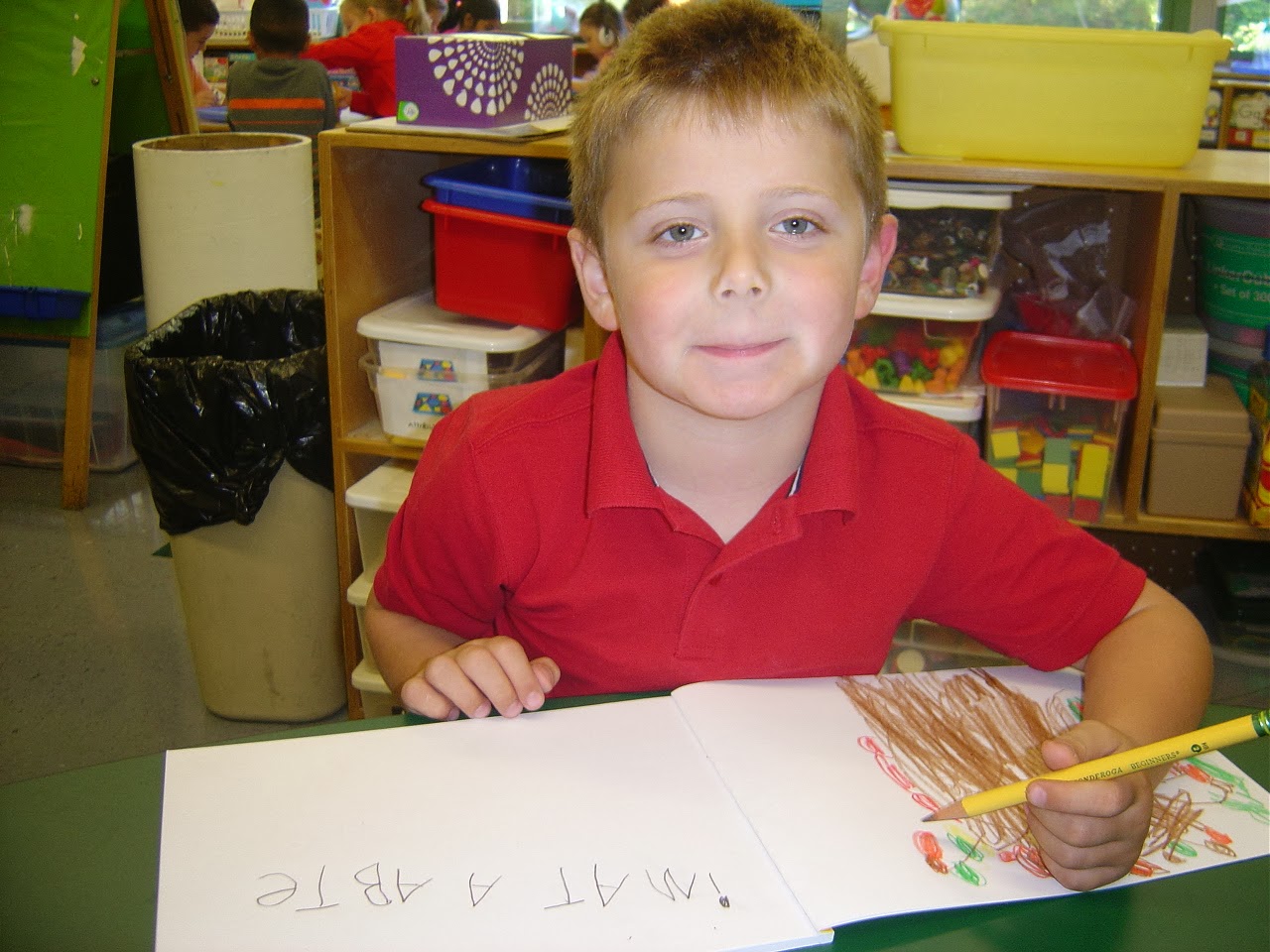
Today we began journal writing!  It can be fun, challenging and little bit scary.  We did great!

Mrs. Parnell took some time to explain that when we write our letters have meaning and then she showed us some examples of what her writing might have looked like when she was a little girl.

We conferred with a classmate to discuss what we might like to write about.

No matter what letters and sounds we know we were all encouraged to try out best!  We also worked on illustrations to go along with our writing.


After recess we took some time to present our journals to one another.  Mrs. Parnell and Mrs. Hoyt were very proud of everyone.  Each student shared their journal entry with the class!


Now it is time to set goals for ourselves.  Each of our illustrations will match our words. Illustrations will have at least 5 colors and will include details like hands and feet on people.  We will try to leave at least two finger spaces between each word we write and we will try our best to write down all the sounds we hear in the words we are trying to write.

Monday, 23 September 2013

Day 15 - Class of 2014 weighs in on literature taught at BHS - Anne Ford, BHS English Department

This post first appeared on the BHS English Department Blog

You can follow the BHS English Department on Twitter - @BHSEnglish1


Mrs. Ford conducted a completely non-scientific poll of the 51 seniors in her British & World Literature classes to find what literary works in the BHS English Department curricula they loved and hated.
For the first time, Into the Wild by Jon Krakauer took top honors this year, supplanting the Class of 2013 favorite, J.D. Salinger’s The Catcher in the Rye. The Great Gatsbyplaced second — but would have taken top honors if votes from “favorite novel ever” counted in this category. There was less consolidation as to favorites than in the past, with more titles mentioned than in previous years.
TheClass of 2014 least favorite work was also new: Romeo & Juliet by William Shakespeare received some scathing reviews. The famous play narrowly edged out Jane Eyre by Charlotte Brontë and last year’s least favorite, Charles Dickens’ A Tale of Two Cities.
Full results of the poll are below.

Favorite BHS Literature:

  1. Into the Wild by Jon Krakauer
  2. The Great Gatsby by F. Scott Fitzgerald
  3. (tie) Of Mice and Men by John Steinbeck; The Catcher in the Rye by J.D. Salinger; andOne Flew Over the Cuckoo’s Nest by Ken Kesey
  4. (tie) Lord of the Flies by William Golding and The Yellow Wallpaper by Charlotte Perkins Gilman
  5. (tie) To Kill a Mockingbird by Harper Lee; The Things They Carried by Tim O’Brien; and The Scarlet Letter by Nathaniel Hawthorne
  6. Honorable Mention (with one vote each): Ender’s GameThe CrucibleJane EyreA Tale of Two Cities; and Their Eyes Were Watching God

Least Favorite BHS Literature:

  1. Romeo & Juliet by William Shakespeare
  2. Jane Eyre by Charlotte Brontë
  3. A Tale of Two Cities by Charles Dickens
  4. (tie) Into the Wild by Jon Krakauer; The Catcher in the Rye by J.D. Salinger; and Their Eyes Were Watching God by Zora Neale Hurston
  5. Dishonorable Mention (with one vote each): The Scarlet LetterThe Yellow WallpaperLord of the FliesThe Things They Carried

Enhanced by Zemanta

Friday, 20 September 2013

Day 14- Students Supporting Their Environment - Brianna Allison, BHS Science Department

This is an original post by BHS Science Teacher Brianna Allison


We have been talking about sustainability and what Americans can do to lessen their impact on the environment. One way to recycle is to compost - so we discussed the benefits in class and started to make our own bins. Wendy Pavlicek and Sean Musselman in the Burlington Science Center provided us with all the materials (bins, sand, worms). They were a huge help in getting this project off the ground! 

We will be adding food scraps and such to the bins all year long and will hopefully have enough compost for each student in the class to take some home with seeds to plant something.


Enhanced by Zemanta

Thursday, 19 September 2013

Day 13 - Thoughts on the New iPhone and the New iOS - Ronak Patel and Xin Zhang, BHS Seniors

This post by Ronak and Xin originally appeared on the BHS Student Help Desk Site

You can follow our BHS Help Desk Students on Twitter - @BHSHelpdesk

This is a series where two Help Desk students trade their remarks and thoughts on current tech events. The big event this week, obviously, is the WWDC 2013, Apple’s field day. Apple announced the iPhone 5S, the iPhone 5c, and iOS 7, all of which will be available later this month.


The New iOS

The new design of iOS 7. (source: Digital Trends)
Ronak: After seeing the full feature presentation of iOS 7, I found myself liking the new design of Apple’s new iOS quite a bit. This new design is much more clean looking than past iOS’s and I see this being popular with almost anyone who is already a fan of Apple products. However, as you see with any new additions, or in this case entire redesigns, it takes people a long time to get used to it, especially since Apple’s past iOS’s have been almost identical. As of now, before getting to play with it for extended periods of time, I feel that Apple is finally stepping up to the plate and getting in some useful features that in general just make people’s lives easier. Multitasking for all applications is the main one I’m looking at currently, and Apple is also claiming that they are managing this with “great battery life”, which I’d be very pleased to see.
I would still like to see some more customizability and overall personalization from Apple, though, that is one part of the spectrum I think Apple really needs to hit ASAP. Now while I like the new design for the most part, I can see how some people may find this to be less of what they wanted. With Apple’s lack of “individuality”, if you must, there is no real way to get around this new design without a jailbreak, and I can clearly see how Matthew Panzarino argues in his article that iOS7 was actually developed for the new generation of Apple customers, the kids. Not to say that it was a horrible idea on Apple’s part to clean up the pallet, but Panzarino makes some very valid arguments and has me just about convinced.
I can’t say all that much right now, but once Burlington gets iOS 7, I will be able to give a more comprehensive review. I have high expectations of Apple’s newest iOS, though, and I’m kind of excited to be able to play with it very soon.
Xin: Apple decides to finally make the leap after 7 years of stagnation and seeing their competitors making leaps and bounds with their user interface. While Android users had their widgets and live wallpapers since the prehistoric age, when dinosaurs still roamed and fire was “the next big thing”, iOS stuck with the same 4×4 grid of app icons for years until the iPhone 5, when they made the miracle jump to a 4×5 grid.
Clearly inspired from the success of that extra row of icons, Apple decided that they should
copy more from their competitors make even more changes. Everything now has colors, and everything looks clean. This is a good and refreshing change, and it is nice to finally see some from a company that’s been so afraid of said change.
iOS 7 will be a relearning process for every iOS user. Apps will work differently andhand gestures will be different (think Windows 8). To put it in short, Help Desk will be a very busy place when iOS 7 is released.
The iPhone 5S and the iPhone 5c
R: Apple’s brand new iPhone, the iPhone 5c, featuring all kinds of new colors!
The new iPhone has a new look, with different, bright and bold colors (which reminds me again of how Apple is starting to lean towards the newer generations). I’m sure with the new iPhone, iOS 7 will look great, and hopefully not lag. Don’t be afraid, though! Apple isn’t planning on changing much, “because it has the things people loved about the iPhone 5 inside. And more”. There is a new A6 chip in it that delivers impressive, and energy-efficient graphics and performance. And once more, Apple has upgraded their camera to give clearer picture on the 4-inch Retina display that I actually think will look really nice.
Honestly speaking, the new iPhone looks like all the rest to me, not in the sense that it is physically exactly the same, but rather, like very new version, it is a little bit bigger, it has better processor, and I guess an overall sleeker look. I think that coming out with so many iPhones so quickly has really (for me) taken away from the excitement. I remember when in 2007, the first iPhone was released, it blew the audience away. Steve Jobs’ first unveilof it was not only the most hyped up, but also the coolest, because back then, the iPhone had some crazy advantages over other phones. More recently, iOS 7 has been picking up the pace and adding brand new features. But Apple claims that they didn’t just want to redesign the iPhone and add new colors, they wanted “an entirely new expression of what an iPhone can be”. From a critical (my) standpoint, to me this seems like mostly talk, because in reality the phone has not even been upgraded all that much, it even contains iPhone 5 parts. This pretty much means to me that Apple knows their fan base, and that for them it isn’t really about the product itself, but rather the name thats on it.
X: I’ll give Apple credit for finally doing some innovation since 2007 (when the first iPhone came out and literally blew everyone’s minds) with the fingerprint sensor, or Touch ID. It is genuinely a good idea, and I genuinely believe it will change the way we think about passwords. But even then there’s the paranoia: Apple claims the user’s fingerprints will never ever touch their servers, it’ll be saved on a chip within the phone. The U.S. Government also said they weren’t spying on their citizens, but then there was that thing.
The rest is just typical Apple: slightly better camera, slightly better processor, and slightly better Siri. After all, it is what the S in every iPhone model has stood for: slightly better. That gold iPhone does look cool though.
The iPhone 5c, on the other hand, is a sneaky way of Apple getting even more money out of their customer’s wallets. It’s got iPhone 5 parts, which I’m sure they have a lot left over in their factories, and its got colorful plastic slapped on it. There is nothing wrong with plastic phones, and these look and feel better than anything Samsung’s ever made, but when Apple is offering a plastic case for the same plastic phone at the great value of $29, you know it’s consumerism at its finest.

The ridiculous iPhone 5c plastic covers. (source: Apple Insider)
Spend that $29 somewhere else, unless you want the back of your phone to look like a game of Connect 4.
Side note: the C does not stand for “cheap”. $99 for a phone is not “cheap”.
The effectiveness of iOS 7 on the iPad 2
X: I remember updating my now 3 year old iPod Touch to iOS 5, intoxicated by the promise of a better user experience. As the progress bar finally hit “100%” and my iPod was rebooting, its new insides ready, my excitement reached a tipping point…. until I saw the familiar aforementioned grid, and realized that changes were marginal, and all I had in my hands was a laggier iPod. That trend continued with iOS 6, and will continue with iOS 7.
That’s the problem facing iPad 2s. It’s an outdated device running updated software. Another thing to consider: iPad 2s do not have retina display, so unless Apple has made changes to its UI specifically for the iPad 2 (which I hope they do), iOS 7 is going to look terrible on an iPad 2. iPad 3, iPad 4, and Mini users, roam free.
R: It’s very easy to think that iOS 7 will run and look amazing on any Apple device, especially the way that they present it. But in reality it will be nothing of the sort, the device is outdated, and the software is updated, there’s really no getting around it. Pretty much exactly like Xin said, unless Apple decided to make some major UI changes for JUST the iPad 2’s, iOS7 is going to be no fun.
It’ll be interesting though, to see how far Apple has gone with iOS 7, and to see how much it makes my iPad lag, which I’m assuming it will. With the past iOS updates, there has been a solid trend of immense lag and battery eating, and I haven’t been convinced yet that this will be so much different than the past.
I remember that on my first year of being on the Help Desk, when iOS 6 was released, and everyone updated to it, there was a rush of people every morning during first period who needed help, and that was not even a huge change from iOS 5. I’m more curious right now to see how this works in a school system, and to see how people will review it when they get to play with it.
One word that describes the audience at WWDC 2013?
X: Drones.
R: *Clap*

Enhanced by Zemanta

Wednesday, 18 September 2013

Day 12 - Marshall Simonds Middle School Technology and Engineering Class

This post originally appeared on the Marshall Simonds Middle School Blog.
photo (11)
Students in Mr. Kille and Mr. Hodges’ class are off to a fast start working on a variety of projects. The 7th graders pictured above have programed their Lego robot using Mindstorm NXT software. The robots can perform many different functions, depending on how they are programmed and constructed. Students can follow existing plans or create their own.
photo (13)
After learning about multiple ways bridges can be designed, students create balsa wood models. The students follow the proper building process – creating thumbnail sketches and then converting the best idea into scale drawings and then moving on to the actual construction of the bridge.
Screen Shot 2013-09-17 at 12.33.27 PM
This student has taken a picture of her scale drawing in Mr. Hodges’ class. Students use grid paper to learn about scale. This assignment requires students to scale their image 6x larger than the original. Once the image has been scaled up, it is redrawn and colorized.
Screen Shot 2013-09-17 at 12.42.41 PM


Screen Shot 2013-09-17 at 12.44.22 PM

Monday, 16 September 2013

Day 10 - Trouble Remembering Passwords? - Jason Landry, BHS Senior

Thanks to BHS Senior Jason Landry for our first student post of the year! You can follow Jason and the work of his BHS Help Desk Classmates on the Burlington High School Help Desk Blog.

You can also follow our BHS Help Desk on Twitter - @BHSHelpdesk
If you are like most BHS students, you are using many different apps and digital tools and have a lot of different passwords to remember. Since school started, one issue we have encountered quite often in the Help Desk is students forgetting their passwords. As a result of this I decided to research 3 different password apps. Why download one of the three apps I’m suggesting?
1. They will keep you organized
2. They are simple to use
3. You’ll become a more responsible student
4. They are free
5. You’ll never forget a password again
These apps are ways to stay organized with your accounts for all different purposes, they are good for students, teachers, and others in the business world. These apps are available for iPads, iPhones, and iPods.
PASSWORD KEEPER:
The first app I found was Password Keeper.
With Password Keeper you need to set one 
keeper-osx-100044569-large
master password to protect all your other passwords. Then, you create an account with your email, and you can chose to create a security question. You can tap the right corner of the screen to add your password and what account that password belongs to, and you can also add a description. The password and account are put into alphabetical order depending on the name of which the password belongs to. This app is good for keeping multiple passwords and combinations to different places, such as a gym locker, all in one place. Important tip: You must remember the master password.
iPASSWORD:
The second app is called iPassword and it is very similar to the app Password Keeper.mzl.scdlsnox.175x175-75You have one master password on this one as well and you can back it up to your email so if you forget the master password it is still sent to your email. This app has multiple tabs with places where you may save your passwords. The first tab is logins, then wallets, accounts, and other. Logins are for social networking sites, wallets are for accounts you might have at a bank, memberships or identification numbers and etc., accounts are for things like iTunes or database accounts. The last tab is for “other accounts” not provided in the other tabs. On any of the tabs you click the right hand corner which is a “+” and add your password and it gets set up in a list in one of those tabs. This is very helpful if you don’t remember your passwords. This keeps your accounts extremely organized.
PASSWORD MANAGER:
The last app I found was Password Manager. This app is very similar to the other two apps  but this one is extremely simple. You still have a master password and there are 5 sections to chose from to classify where your passwords belong. You can also back up your passwords so they are remembered on your computer as well from this app. This app is very helpful for those looking for a simple way to store passwords.
images
These are all helpful apps to the everyday life of a digital citizen. As a digital citizen it is important not to share your passwords with anyone or anything (Spam) that you can’t trust, especially if that password is protecting something important. Make sure you have multiple passwords that are creative don’t use the same password to often.
Keeper pic

Friday, 13 September 2013

Day 9 - Heroes Assembly 9/11/13 - John Lyons, Pine Glen Elementary Principal


(On Wednesday) Pine Glen Elementary School had our Heroes Assembly. On this day every year we say a big thank you to the Burlington Fire and Police Departments and the brave men and women in the Army, Air Force, Coast Guard, Marines and Navy who keep us safe. We also take time to remember Thomas McGuinness, a former Pine Glen Student and Lt. Commander in the Navy, who our Pine Glen community lost on September 11, 2001.

I would like to thank the McGuinness Family (pictured below) for attending our school assembly and all the men and women who keep our community safe.  For those who weren't able to attend, check out the video of the entire ceremony above. It was a special day at Pine Glen!


The Pine Glen Chorus
Pictures of Time Pine Glen Grad Thomas McGuinness

Thomas McGuinness' sister and mother
Pine Glen students and our local heroes, recite the Pledge of Allegiance

Thursday, 12 September 2013

Day 8 - The Great Eight - Sean Musselman, Burlington Science Center


This is the first year Burlington is implementing the revamped evaluation standards and techniques mandated by the Commonwealth of Massachusetts. While change is never easy and we are far from the day of knowing whether our efforts will be fruitful, I've put my full trust into our town's administrators and our union's leaders that the course we've charted is the best for students, teachers, and our community. 

While it has been well documented that the state's new evaluation standards include 33 indicators, Burlington has set its targets on what have been dubbed, "The Great Eight" indicators to get this process of the ground without becoming overwhelmed in the process. 

Over the next ten months I'll be thinking critically and working actively toward the following: 
  • Demonstrating sound subject matter knowledge 
  • Designing units of instruction that are rigorous and standards-based 
  • Developing well-structured lessons with challenging, engaging objectives 
  • Adjusting my practice based on the analysis of a variety of assessments 
  • Engaging and motivate students during my lessons and programs 
  • Guiding students to identify strengths, interests, and needs while challenging themselves
  • Using strategies that support families to participate in their child's class and community
  • Collaborating with colleagues while developing standards-based units, analyzing student performance, planning appropriate curriculum / interventions, and more. 
While many of these standards I, without a doubt am working steadily toward on a day-to-day or week-to-week basis, there are some such as "adjusting my practice based on assessment" and "designing units of instruction that are rigorous and standards-based" that have not been a major piece of my experience at the Science Center thus far and will immediately make their mark on my teaching as I begin to brainstorm how and where I can best meet these expectations. I relish the opportunity to dive into these qualities of an effective teacher but also recognize there is certainly the possibility of ineffectiveness or out right failure. Fortunately I am not alone as our system aimed to achieve a number of shared goals between departments and fellow collaborators like Wendy and I.

What are your expectations of your evaluation process? How will the process help you reflect and become a better teacher? 

Wednesday, 11 September 2013

Day 7 - Year of Creativity - Christina Chang - BHS Art Department

This post originally appeared on Christina's Blog - A Space To Create

Hope you had a great summer and are ready to enjoy an art filled school year. The theme for the art department this year is CREATIVITY. Seems obvious for an art class, but a great theme to make sure that all of the lessons that I am teaching this year are allowing the freedom to be creative and express yourself.

Thursday, 5 September 2013

Day 3 - If You’re Going to Use iPads With Kids, You’ll Have to Know This Trick, Ben Schersten, Francis Wyman IT Specialist


Okay, I admit it. I make mistakes. And I love the “undo” command. You know, command+z in OS X and ctrl+z in Windows.

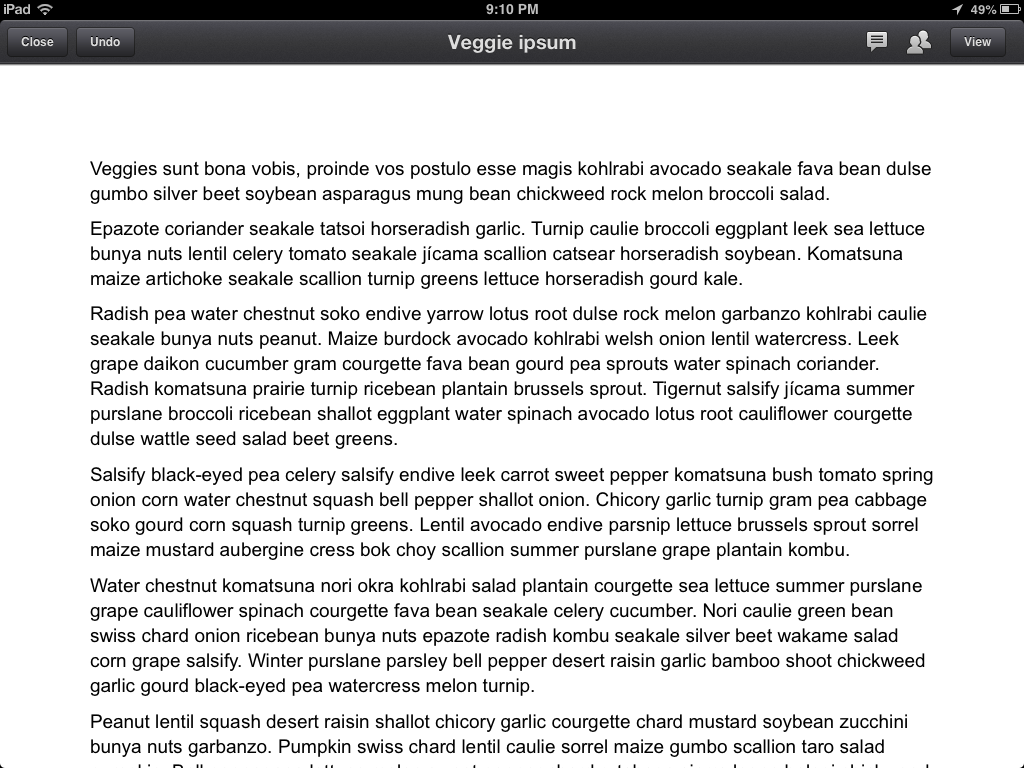
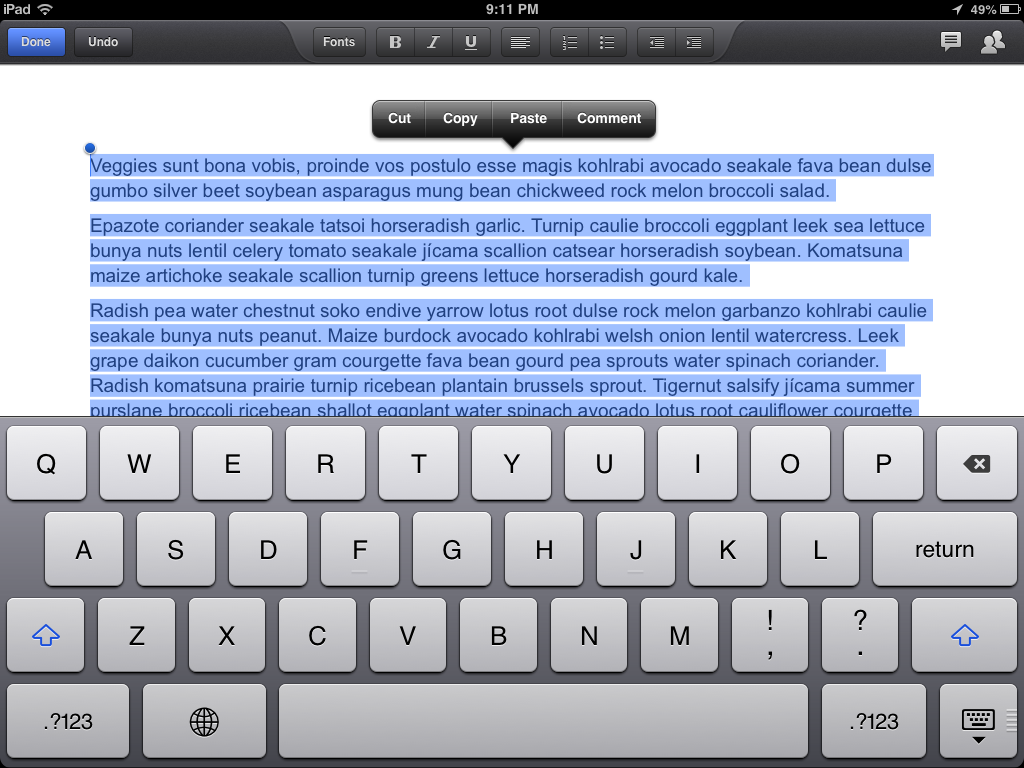
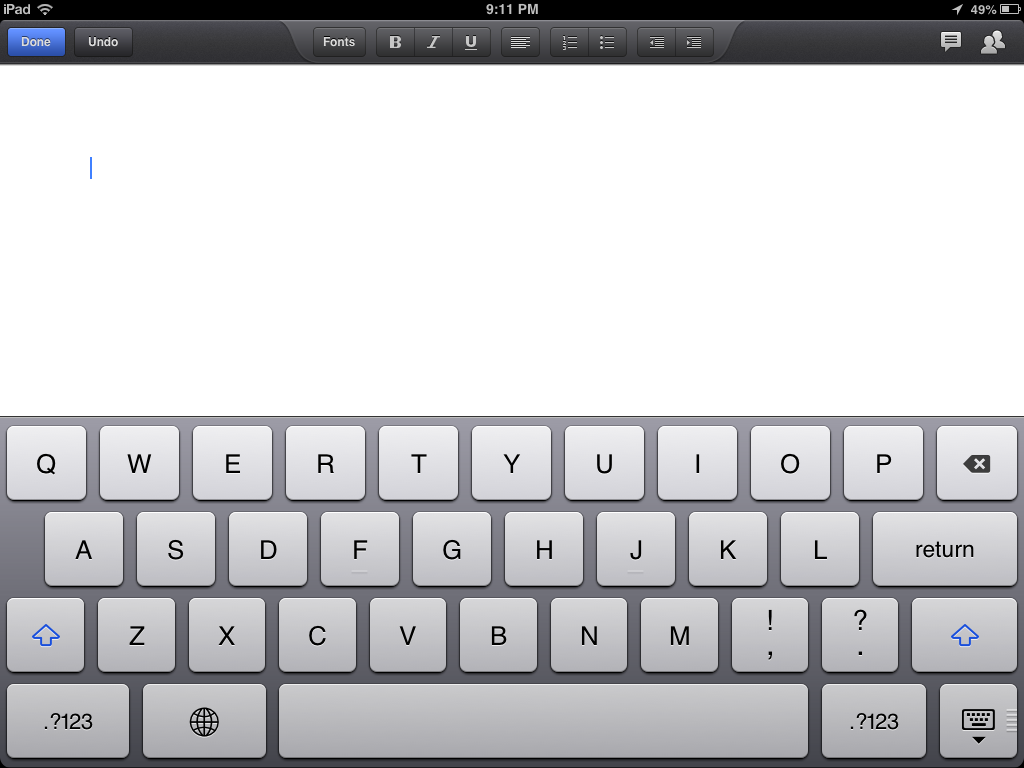
And if you’ve ever worked with kids you know they make mistakes too. There they are, writing away when somehow they manage to select a paragraph or two (or maybe they “select all”) and accidentally bump the delete key… oops.
Some text…

Selected…


And deleted…


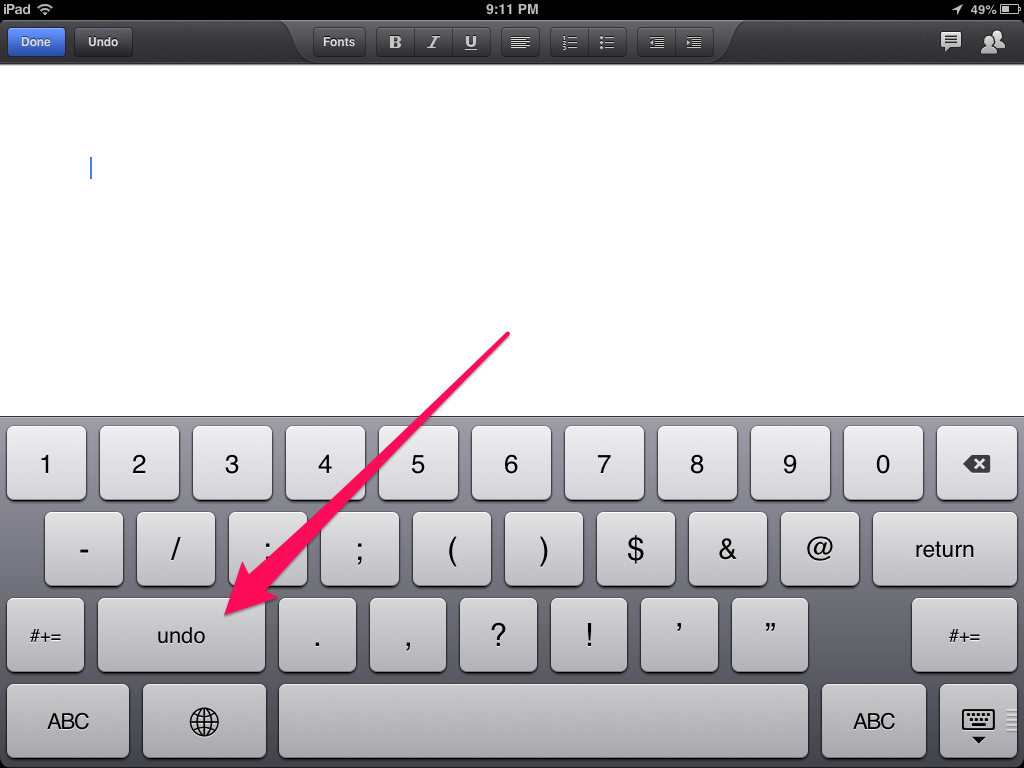
Oh no. This is an iPad; there’s no command+z. But… there is an undo button. With the traditional keyboard up, tap the “.?123″ button to bring up the secondary keyboard. There, on the left is the “undo” button.


Google Drive and Pages both have their own undo buttons (up top on the left, did you notice those in the screenshots?) but this works everywhere. Evernote, Notes, etc. Anywhere you enter text.
So, the next time your students lose a paragraph of work (or more), you can help them get it back.
Sadly, the undo button is not present on the iPhone.
——-
photo credit: llauren via photopin cc
For those out there that noticed the Lorem Ipsum text in the screenshots, the Veggie Ipsum generator I used is here. For the meat-lovers, try Bacon Ipsum.


Enhanced by Zemanta

Wednesday, 4 September 2013

Day 2 - Year 12: Better (bonus: twins!), Dan Callahan, Pine Glen Elementary School Instructional Technology Specialist

This is going to be a HUGE year for me, for lots of reasons, but I might as well get the most important reason out up front:
Yeah. My wife is expecting twins, who should arrive, if all goes according to plan, sometime in December.
So there’s that. I’m super-excited. Life is going to change in ways that both amaze and terrify me, but I’m very much looking forward to meeting my children.
To answer the question now: No, we don’t know their genders. We’ll find out in December.
But that’s NOT what this post is really about. It’s about the work.
Year 12. Year 4 as an Instructional Technology Specialist. Crazy.
Laura and I are going into our third year of working together as a part of the Library & Technology Center. We’re trying to tighten things up, make some positive changes to the program, and make sure we do a better job of getting the work done.
The biggest shift this year is in the schedule. In previous years, I was completely flexibly scheduled, and the kids had a once a week 30 minute library class. This year we’re changing it up to a 45 minute LTC class. The goal is to increasingly unify our program, and make sure we have enough instructional time to introduce kids to the foundational information and digital literacy skills we believe they need to be independent learners.
This year we’re bringing two more first grade classrooms online with 1:1 iPads, and the whole district will now be 1:1 in grades 1 and 4-12. I did a lot of training last week to try and prep teachers for it, and will continue to do my best to support teachers and students in this new learning journey. Next year we’ll bring the remaining grades in. In the meantime, I’ll continue to support those classrooms with the computer lab and the 60 or so other iPads we have in the building, plus a new handful of Chromebooks.
So what’s this year really about, then?
It’s about Better.
It’s about taking the base of the past three years as a tech specialist, and doing the job Better by focusing on my learning goals for my students.
It’s about looking at the 1:1 program, and using them Better to provide a richer classroom experience.
It’s about focusing the LTC program, and making it Better by more tightly integrating library and technology.
It’s about building Better relationships with my teachers.
Its about building off my professional development experience to date, and seeing how I can provide Better learning opportunities for my staff.
It’s about figuring out how being a parent will make me a Better teacher.
I guess I’d Better get some sleep now. It’s going to be a busy year.