Pages

Subscribe:
Showing posts with label Burlington High School Help Desk. Show all posts

Monday, 13 April 2015

Day 133 - Leading with Learning & Student Voice at #NE1to1 - Jen Scheffer - BPS Instructional Technology Specialist

This post first appeared on the BHS Help Desk Blog


Friday, April 10th was Burlington Public Schools annual New England 1:1 Summit and the second annual New England Student Showcase sponsored by the BPS EdTech Team. Once again, the focus of this professional development event was exactly where it should be: on student learning.
This year’s event was held at three different locations in the district; Burlington High School, Marshall Simonds Middle School, and Francis Wyman Elementary School. Offering three different locations allowed attendees to personalize their learning experience based on the specific type of 1:1 environment they wished to see. The event began with a Q and A keynote panel followed by classroom tours and the Student Showcase. This year’s showcase, like last year’s Summit, featured students representing other 1:1 or BYOD districts in Massachusetts. Students (and their teachers) from Shrewsbury, Hopkinton, Reading, Hamilton-Wenham, and Bishop Feehan came to Burlington to share their digital creations and articulated how using technology impacts their learning. The showcase was by far the most exciting part of the Summit. It allowed visitors to truly understand the impact 1:1 environments have on student learning. I had the pleasure of speaking with a young lady from the Shrewsbury Innovation Team and learned how she used Explain Everything to create a cell analogy project for one of her science classes. This was just one of the many types of personalized learning experiences shared by the students who attended.
Students from Campbell High School in Litchfield, NH attended the NE 1:! Summit
Students from Campbell High School in Litchfield, NH attended the NE 1:1 Summit
The Lower Library of Burlington High School, the location of the Showcase, was bustling with conversations between students, teachers, administrators, technology directors, and school board members. It was an incredibly meaningful learning experience for everyone involved. Students who showcased their digital creations underscored to attendees what can happen when they are given choices to demonstrate their learning. It was refreshing to see a group of students in attendance from Campbell High School in Litchfield, NH (ironically where I began myteaching career!) along with a team of teachers and administrators. Campbell is considering a technology rollout and wants to ensure that their students play a role in the decision-making process. Very smart of Campbell indeed! Involving students in your technology initiative is a consistent message sent by the entire BPS Edtech team not just during our Summit but at every event we host throughout the year. The BPS Edtech team believes students should play a role in the 1:1 planning process and actively support technology initiatives as the needs of the school community evolve. This happens in Burlington through our student run Help Desk programs. Students play a significant support role regarding technology integration in Burlington and their contributions are appreciated by our entire community. They are go-to people throughout the day for any student or teacher needing assistance with technology. We have a culture where students are given authentic leadership opportunitiesand this was evident at the BHS Summit.
Cat Hoyt, BHS senior and member of the Help Desk, served on the keynote panel and shared from a student perspective what it’s like to be a technology leader at BHS. Throughout the Q & A session, several questions were directed specifically to Cat. This proves many districts are interested in understanding how technology is impacting a student’s education. Cat offered her candid thoughts about 1:1 teaching and learning and as always, showcased her leadership and professionalism. One attendee actually said to me, “she could run this whole thing herself.” I couldn’t agree more. My hope is that student involvement in professional development events for educators becomes the norm rather than the exception. Our job as educators and administrators is to meet the needs of our learners. Listening to what works for them in terms of technology in the classroom is essential if we are to provide them with the best, most relevant education possible.
The BPS Edtech Team hopes the Student Showcase continues to grow. It’s an authentic way for educators to learn about the impact technology has on student learning, but it serves an even greater purpose. Events like the Student Showcase are real world networking, leadership, collaboration, and public speaking experiences for the students who participate. These are necessary skills for any career path and presenting at the NESS is an impressive resume builder. I’d like to extend my sincere thanks to the teachers and students of Shrewsbury, Hamilton-Wenham, Bishop Feehan, Hopkinton, and Reading for taking time out of their schedules to join us in Burlington. Your contributions made the event a huge success and we hope you will return next year!
The video below recognizes student involvement in this year’s Summit and attempts to capture the excitement and atmosphere of the day. You can also check out Tweets from the day by reading the #NE1to1 Storify or you can read this great reflection about the Summit written by attendee Andrew T. Garcia.
Thanks again to all who joined us in Burlington for the 2015 New England 1:1 Summit and for your support of 21st century teaching and learning. We’ll see you in 2016!

Wednesday, 25 February 2015

Day 101 - Windows 10 Technical Preview - Sid Srivastava - BHS Junior


As soon as Windows released Windows 10 Technical Preview Evaluation Copy Build 9926, I downloaded it to examine its new features. I discovered many cool features like Cortana Integration and Spartan web browser. For my first assignment in Help Desk, I created a seven minute screen cast demonstrating these two features, along with many others. I hope you will take a few minutes to watch what I made.

Thursday, 15 January 2015

Day 83 - Engaging Learners Beyond the Screen with Osmo - TJ Horgan - BHS Senior

This post originally appeared on TJ Horgan’s help desk blog
Screen Shot 2015-01-13 at 1.02.52 PM
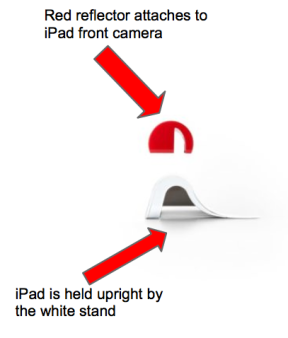
Screen Shot 2015-01-13 at 11.42.32 AMOsmo, a unique gaming accessory for the iPad, was created by Tangible Play, Inc. in 2014, and that is exactly what Osmo is. Osmo uses groundbreaking reflective artificial intelligence technology and is the epitome of tangible play, as it introduces kinesthetic learning opportunities for developing minds and closes the gap between the digital and physical worlds. A kinetic learner myself, I was immediately drawn to the presentation of this tool. In essence, the Osmo is a simple reflector that is placed on the iPad’s front camera, which projects the surface directly in front of the iPad to the camera. However, the impressive craftsmanship is exemplified by the seamless integration of tangible images projected and displayed to the iPad’s screen. The Osmo started kit comes with a base and reflector, Tangram and Words games pieces and three apps: Tangram, Newton, and Words. To access the the apps, users will launch Safari and navigate to www.playosmo.com/start.

osmo-33
WORDS
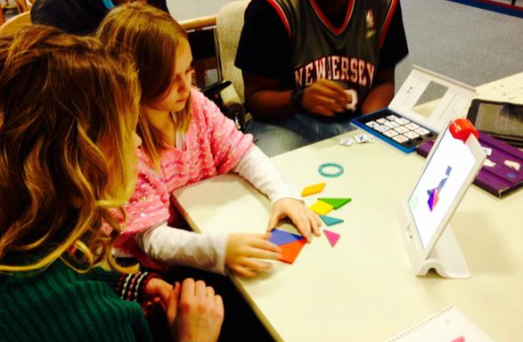
The first app, Words, engages learners by asking them to guess an on-screen hidden word by lining up the letter game pieces. Students can play alone, or teachers can encourage healthy competition by allowing students to race against their classmates to practice word recognition and spelling. Teachers can elect to use the existing library of images, or create their own image libraries. Words is an example of how well Osmo recognizes minuscule differences in paper so quickly. Osmo can recognize a letter as soon as it is placed within about 8 inches of the iPad. Though my experimenting with incorrect placements came at the frustration of my second grade Osmo partner, Mrs. Scheffer’s eight-year-old daughter, I soon became impressed with how advanced, but, at the same time, simple, the letter recognition is. Osmo can distinguish the specific letter and color of the mini-card instantaneously, and, not only is it impressive, but it is useful, for developmental spelling and word association skills.
TANGRAM
Screen Shot 2015-01-13 at 11.59.44 AM
BHS Help Desk student Kristin Johnson teaches a lesson with Tangram
 Tangram, appropriate for ages 4+, is the most tangible of Osmo’s three creations, as the user is tasked with matching plastic puzzle pieces to a design displayed on the iPad’s screen. There are three levels of the game; easy, medium, and hard which allow teachers to customize the level of play for his or her students. Mrs. Scheffer’s daughter became bored with Tangram relatively quickly, as she soared through each level with no problems. Ideally, students over the age of seven would not be using this app too heavily.
NEWTON
osmo-newton-470x790px
Newton is the most challenging tool that is packaged with Osmo, as it incorporates advanced spatial relation skills into an ultimate, clear-cut, goal and achievement. Virtual pellets are dropped from the top of the screen, and the user’s mission is to draw a series of obstacles that reroute these pellets to a series of targets. The obstacles, however, are drawn with an actual pen on actual paper. Osmo registers the lines drawn on your blank canvas and adds them to the on-screen course. With added targets and added pellets, the challenges get more difficult, but are definitely attainable. This is the one tool on Osmo that I saw Mrs. Scheffer’s daughter’s interest genuinely pique.
Overall, Osmo is a well-developed tool that can improve the spatial relations, spelling, and problem-solving skills and abilities of elementary school-aged students. Osmo could fairly easily fit into a math or English curriculum. The Osmo kit retails for $79.99, which is an affordable price for a school district if they are looking to continue to innovate in the classroom with technologically engaging devices. Gathering from my conversation with Mrs. Scheffer, she believes that the Osmo would be a beneficial addition to a “center” in an elementary classroom, giving students an opportunity to rotate through an individualized or collaborative learning station.

Monday, 27 October 2014

Day 39 - Get a Clue at MassCUE - Nathan Rippin - BHS Senior

This post first appeared on Nathan's Blog
This past Thursday my Help Desk colleagues and myself went to one of the largest educational technology classes in the region. It was epic and awe inspiring. I was able to meet many new people and be placed in the spotlight for a few minutes. People were wide eyed when they read Burlington on our badges. They were asking us questions related to the implementation of a 1:1 environment.
Screen Shot 2014-10-24 at 10.59.33 AM
They also wanted to get our opinions on topics such as web filtering and the hindrance in the classroom. We met students from other tech teams in the area such as Reading and Groton-Dunstable public schools. They were awesome people and bonds like this will last a long time. We plan on having a tech team meet up later this year. Mrs. Scheffer and Mira Medhi both presented on Augmented Reality in the classroom. I helped them the with workshop part of the session and utilized Google Glass to film the attendees first time using Aurasma. If you want to learn more about my colleagues time at MassCUE please visit us at  Bhshelpdesk.com.

Wednesday, 15 October 2014

Day 31 - Getting Started With Linkedin - Nikhil Thakkar - BHS Senior

This post first appeared on the BHS Help Desk Blog

This is the first screencast of a series explaining LinkedIn. Through this series, you will learn how using LinkedIn will benefit you as a student and future young professional. In this first screencast, you will learn the basics of the LinkedIn interface. You will also be provided with an overview of several features of the website. Upcoming videos will go into specifics and help you understand each feature more in depth!


Thursday, 19 June 2014

Day 178 - Bring Videos To Life With eduCanon - BHS Help Desk


Video in the Classroom
Many teachers incorporate video both in and outside of the classroom for instructional purposes. When integrated effectively, videos can be a powerful instructional tool. Video can also be used to engage and motivate students, promote critical thinking, and spark lively classroom or online discussions. And of course, the integration of video can be used to flip lessons. Teachers can now create screencasts for students to watch outside of class. This allows the classroom to become a more collaborative environment with an increased amount of hands-on activities (as it should be!). If you do flip lessons, whether you create the screencast yourself, or you assign students to watch a video from Khan Academy or another high quality educational video site, it’s important to ensure your students understand the content and concepts taught in the video. With a tool like eduCanon, teachers can monitor student progress towards achieving the learning goals and easily determine what each student needs- individualized or small group instruction or more challenging, independent activities.
An eduCanon Overview
eduCanon is a free, interactive, and easy to learn online platform that increases student engagement by allowing teachers to embed questions with explanations inside videos. It works perfectly on an iPad and could be a useful tool in virtually any content area. As mentioned, if you flip lessons, and use videos as part of your flipped lesson strategy, eduCanon is a no-brainer to add to your technology toolkit. Built by teachers, for teachers, eduCanon allows lessons to be differentiated, is perfect for formative assessments, and prevents students from skipping content. The best part is that this is done all in real-time.
Signing Up and Building Lessons With eduCanon
Educators sign up for eduCanon with either Google or an Edmodo account. Once the account is created, teachers are assigned a unique teacher search code they share with their students. This allows students to access the teacher-created lessons, which can be public or private. After signing up for an account, teachers can start building their lessons. Building a lesson is just as simple as signing up for an account. Teachers give each lesson a title, enter the learning objective, select the grade level, topic, and a subtopic. Next, the teacher simply copies and pastes the URL of a video from YouTube, Vimeo, or Teacher Tube and then selects build question. Teachers can add multiple choice questions and provide students with an explanation for each response. Once the lesson is completed, teachers select assign. The signup process for students is even easier. Here is an excellent tutorial showing students exactly how to signup and access their teacher’s class. My students were signed-up and completing the lessons I had built in less than five minutes. I had copied and pasted a link to my eduCanon lessons on my class blog, but could have also Tweeted a link to the lessons to my students using a unique hashtag. This is an excellent way to incorporate social media into your classroom (if you school allows social media).
Teacher view of questions in eduCanon lesson
Assigning Lessons
Teachers can add up to 8 classes and each class is given a name and a description. I teach two sections of Digital Literacy, but since both sections are completing the same lessons and are relatively small, I decided to create just one class. To assign the lesson, all I had to do was drag and drop the lesson under the appropriate class and selected a due date from the built-in calendar. And that’s all was to it. It was a very simple process and the learning curve for eduCanon is minimal.
Teacher view of lesson "bulbs" in eduCanon
Teacher view of lesson “bulbs” in eduCanon
Monitoring Student Progress
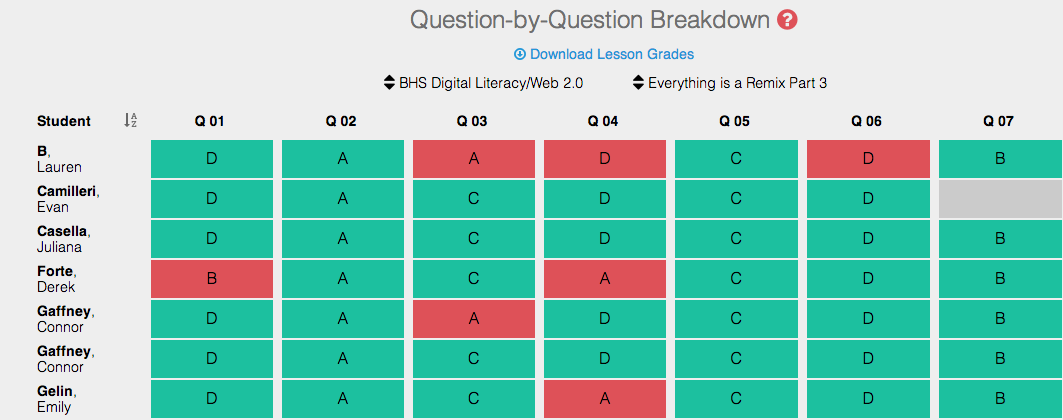
To view student progress on the lesson, the teacher selects monitor. eduCanon provides a question-by-question breakdown and displays each class, lesson, and student progress in that specific lesson. This feature provides a complete picture of student performance and helps teachers identify which concepts may need further review or practice. This is one of the features I liked best about eduCanon because it not only showed me which students had completed the lessons, it helped me determine the difficulty of the lesson and individual questions. eduCanon has an excellent walkthrough on monitoring student progress.
Teacher view of student progress in eduCanon
eduCanon From the Student Perspective
eduCanon offers students a personalized learning experience. While watching a video, students can control the pace of their learning by pausing and rewinding whenever necessary, however they are unable to fast forward, which is a great feature! Videos from YouTube, Vimeo, or TeacherTube are supported in eduCanon.  I recently introduced eduCanon to my Digital Literacy students and the results were positive. When I asked for their feedback, students said they liked how the video would pause on its own and a question would follow. They also commented that it functioned well on their iPads.
Student view of video lesson in eduCanon
Additional Support and Features
The comprehensive eduCanon FAQ page provides answers to commonly asked questions about building, assigning, monitoring, and managing students. If you try eduCanon and decide you want even more features, such as the ability to ask open-response questions or access to the moren than 10,000 lessons in the public lesson library, an annual eduCanon pro subscription is available for $80.00. Additionally, teachers can download lesson grades in .csv format for easy analysis in Google Sheets or import into current gradebooks. Whether you try the free account, or opt for a pro subscription, I highly recommend integrating this tool into your classroom for the 14-15 school year. eduCanon will have a positive impact on student learning and it is an excellent way to incorporate the iPad into your instruction. I’ve showed this tool to a few teachers here in Burlington and they are very excited to start using it next school year.
Learn More About eduCanon this Summer with the BPS Edtech Team!
Join members of the Burlington Public Schools Edtech Team and educators from across New England for our summer Edcamp Series. Work with your colleagues on building eduCanon lessons that will engage and excite your students!
Don't forget to register!

Monday, 16 June 2014

Day 175 - Summer Professional Development Options - Jenn Scheffer, BHS Instructional Technology Specialist

This post originally appeared on the BHS Help Desk Blog
Image Credit - msscheff's Instagram 
With summer just a few weeks away, I wanted to share a broad range of hands-on, high quality professional development opportunities for Burlington teachers, staff, and administrators to explore. Whether you are looking for collaborative, teacher-led formats such as an Edcamp, want time to experiment with technology tools that can engage all learners and solve real instructional challenges, or wish to learn from experts who teach your content area, the options I’ve curated have the unique needs of educators in mind. I also wanted to share professional development options for high school guidance counselors, including resources to become a Bullying Prevention Specialist, as well as Special Education and ELL teachers. Just as our students have unique needs and ways of learning, we as educators do as well. We cannot take a one-size-fits-all approach in the classroom, nor should we when it comes to our own professional development. So read on, see what catches your eye, and please don’t hesitate to contact me if you have any questions.

Attend a Summer Edcamp Right Here In Burlington
BPS Summer Edcamp Series
The Summer Edcamp Series provides informal participatory professional development for teachers of all grades and content areas. Attendees can lead a session or just join in the conversation and collaboration with others. This event is a great opportunity to learn and develop your learning network.
Massachusetts Digital Publication Collaborative
Learn from and share with others while curating and creating digital resources for your classroom during the Collaborative sessions.  This year’s Collaborative will be held in partnership with the BPS Summer Edcamp Series and provide a unique foundation for the development of digital content for your classroom with the support of the BPS EdTech Team and other teachers in your content area. Register for FREE for either event by clicking here. BPS Summer Edcamps and the MADPC will be offered Tuesday July 15, 22, 29 and August 5 from 9:00 a.m. to 1:00 p.m. at Marshall Simonds Middle School.
Explore DIY Professional Development with Resources from Edutopia
summer-pd-2011tocEdutopia is offering a free, downloadable summer rejuvenation guide filled with tips and ideas on how to get the most out of your summer. Whether you wish to grow your network or are looking for tools and resources for service-based or blended learning opportunities, odds are your professional development needs will be met through one of  Edutopia’s manyvirtual workshops. For new educators, there’s a five-week new teacher boot camp series facilitated by Lisa M. Daabs, founder of the new teacher Twitter chat.
Learn with Educators From Across the World by Attending EdmodoCon Summer 2014
Screen Shot 2014-06-10 at 8.22.58 PMEdmodoCon is an 11 hour virtual educator conference taking place Wednesday, August 6, 2014.
The event will be live streamed and participants can come and go as they please. All sessions will be archived for educators to watch at their convenience. Learn about new and creative ways to use Edmodo and integrate technology into your classroom. Prior to registering, be sure to test your device to ensure you’ll be able to participate. Registration is free and you can sign-uphere. To learn more about EdmodoCon, you can check out the recorded sessions from the 2013 event. Additionally, Edmodo has archived webinars from this past school year that you can also watch. Check out Improving Classroom Engagement with iPads and Edmodo from Chicago Public Schools to learn more about leveraging the iPad in your 1:1 classroom.
Participate in a MOOC (Massive Open Online Courses)
Coursera - Offers an extensive list of free, online courses from some of the world’s most well-respected and recognizable colleges and universities. Courses typically run 4 to 6 weeks and require an average of 4 to 6 hours of work per week. Many of the courses offer official recognition of completion from Coursera and its affiliated universities with a verified certificate. This credential can be added to your CV and shared with your employer through a secure URL. Educators can search for a wide variety of courses by subject area or search through 58 current course offerings on theTeacher Professional Development page. A small sample of some of the courses coming up this summer and early fall include:
Tinkering Fundamentals: A Constructionist Approach to STEM Learning (June 19th)
Tinkering activities provide a powerful way to inspire students’ interest, engagement, and understanding in science. The Tinkering Fundamentals course will help educators and enthusiasts develop a practice of tinkering and making. This course will focus on key design elements of high-quality, science-rich tinkering activities, effective facilitation strategies and environmental organization.”

Applying Principles of Behavior in the K-12 Classroom (University of Houston-June 23rd)
“In this class you will learn how to conduct a functional behavior assessment (FBA) and apply principles of behavior in the public school classroom in order to promote positive classroom behavior and intervene effectively when faced with challenging behavior.”
Copyright for Educators & Librarians (Duke University- July 21st)
“Fear and uncertainty about copyright law often plagues educators and sometimes prevents creative teaching. This course is a professional development opportunity designed to provide a basic introduction to US copyright law and to empower teachers and librarians at all grade levels. Course participants will discover that the law is designed to help educators and librarians.”
Designing for Deeper Learning: How to Develop Performance Tasks for the Common Core (Stanford University- September 8th)
This MOOC is designed for grade 6-12 teachers working in the core disciplines of mathematics, language arts, history/social studies, and science. It is recommended that participants currently teach or have access to a classroom for which they can design a performance assessment and then implement that assessment. Participants will work collaboratively with other educators in their discipline to accomplish course learning goals and assignments.”
Check out this short video to learn more about the power of a MOOC:

Take an Affordable, Self-Paced, Flex-Time Course Through the Professional Development Institute
appleFor educators looking for salary advancement or credential renewal, PDI courses may be an option. PDI offers convenient, flex-time courses for k-12 educators. Courses range from implementing common core writing, literature, and math standards, to character education, and comprehension strategies. A full list of the courses being offered can be accessed here. Each course has five online tests and five written assignments. PDI courses are worth 3 ⅓ semester units (5 quarter units) of graduate credit from University of California San Diego (UCSD) Extension, a WASC accredited university. Credit is available for an additional $184 for the top                                             twelve flex courses (all others only $230). Educators have a year to finish courses after registering online.
Bring Collaboration to the Next Level: Attend An Edcamp (After Attending Edcamp Burlington of course!) 
Screen Shot 2014-06-10 at 8.32.47 PMNo matter where your summer travels take you, there is likely to be an Edcamp in your area! Heading to the Cape? Check out Edcamp Cape Cod on August 11th, or you can venture over to The Ethel Walker School in Simsbury, CT and experience Edcamp Connecticut. The Granite State’s Antioch University New England, located in Keene, NH is also hosting an Edcamp on August 20th. Visit the Edcamp Wiki for a full list. If you’ve never been to one, an Edcamp is an incredibly unique professional development experience. When I attended Edcamp Boston in 2013 I really didn’t know what to expect. But by the end of the day, I was completely sold on the model and I wish more PD could offer me the same type of personalized experience that an Edcamp provides. The collaborative nature, teacher-driven agenda, and informal yet energizing atmosphere of an Edcamp are just a few of the reasons why every educator should attend at least one and experience it for him or herself. On top of all that, Edcamps allow you to walk away with an arsenal of practical, engaging, and most often free tools and resources that can be integrated into your practice right away. Finally, Edcamps allow you to connect with your colleagues and develop meaningful and lasting relationships. It’s the ideal way to grow your personal learning network. But don’t take my word for it, see for yourself what Edcamps are all about.
Explore New Applications & Move the iPad from Content Consumption to Content Creation
Richard Byrne, author of the award-winning, must-bookmark blog Free Technology Tools for Teachers, shares a vast amount of resources for teachers of all grade levels and content areas. In addition to his main site, Richard has a separate iPad Apps for Schools site where he shares resources specific to the iPad. Recently, Richard highlighted iPad apps that teachers may want to explore this coming summer. Be sure to check out:
Additional Virtual PD Opportunities:
Below are direct links to educational webinars covering everything from common core to flipping your classroom. Webinars are free, convenient, and many offer certificates of completion.
Engage in Professional Reading
Summer is the perfect time to catch up with some professional reading. Check out this great list of fiction and nonfiction titles that was curated by educators for educators (and administrators) during a recent Sunday morning Twitter chat. You can also visit the BHS library for a collection of titles that may be of interest to you including Born Digital, It’s Complicated, Smarter Than You Think, The App Generation, and Chris Brogan’s The Freaks Shall Inherit the Earth. A special thanks goes to BHS Librarian Susan Disanto (@reddevils_lib) for purchasing these books for the faculty, staff, and administration of Burlington High School.
I hope you will find these resources useful and will further investigate those which you feel will best meet your individual professional development needs. I wish you all a restful and relaxing vacation and here’s to a great summer of learning!
Image Credit - msscheff's Instagram